
This article was prepared for users who created a Binance account in the past but never actively used it and are now unsure about two important points:
- Which referral code was used during registration
- Whether the account is receiving the correct trading fee discount
Many users discover later that their account is not eligible for the full fee rebate, which is why deleting the account and re-registering properly can be a reasonable option.
1. Why You Must Reset KYC Before Re-Registering
Before deleting your Binance account, resetting (canceling) KYC verification is essential.
If you delete your account without resetting KYC, Binance may restrict re-registration with the same identity for 2–4 weeks.
You may still register with a different identity, but that is not recommended for most users.
To avoid delays, always reset KYC first, then proceed with account deletion.
2. How to Reset Binance KYC Verification
Follow these steps carefully:
1. Click the headset (Support) icon at the top of the Binance screen.
2. Scroll down and select Get Support.
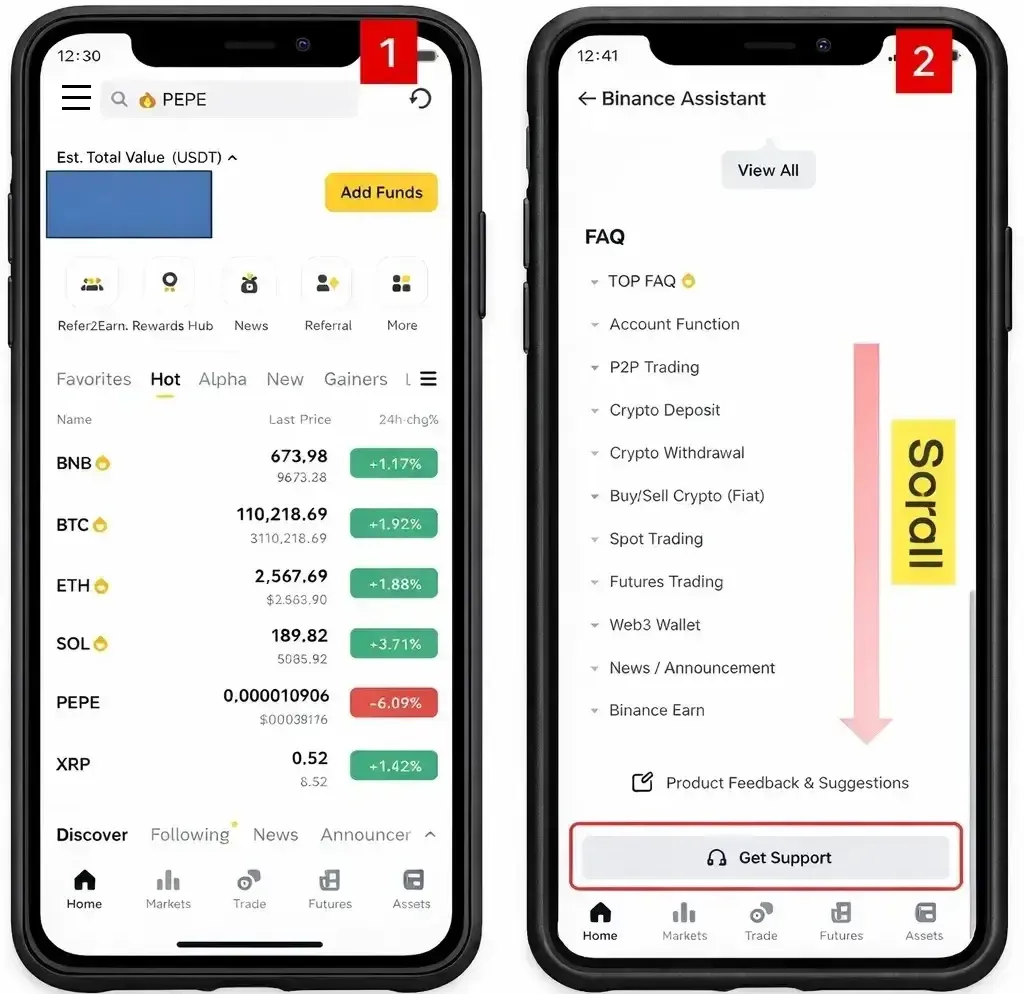
3. Click the “+” icon located in the bottom-right corner.
4. Select Self Service.

5. From the center menu, choose KYC.
6. Click Reset KYC.

7. A screen will appear asking for the reason to reset KYC.
Select “Documents expired”. (This option is usually processed the fastest.)
8. Check the box to confirm your agreement to reset KYC.
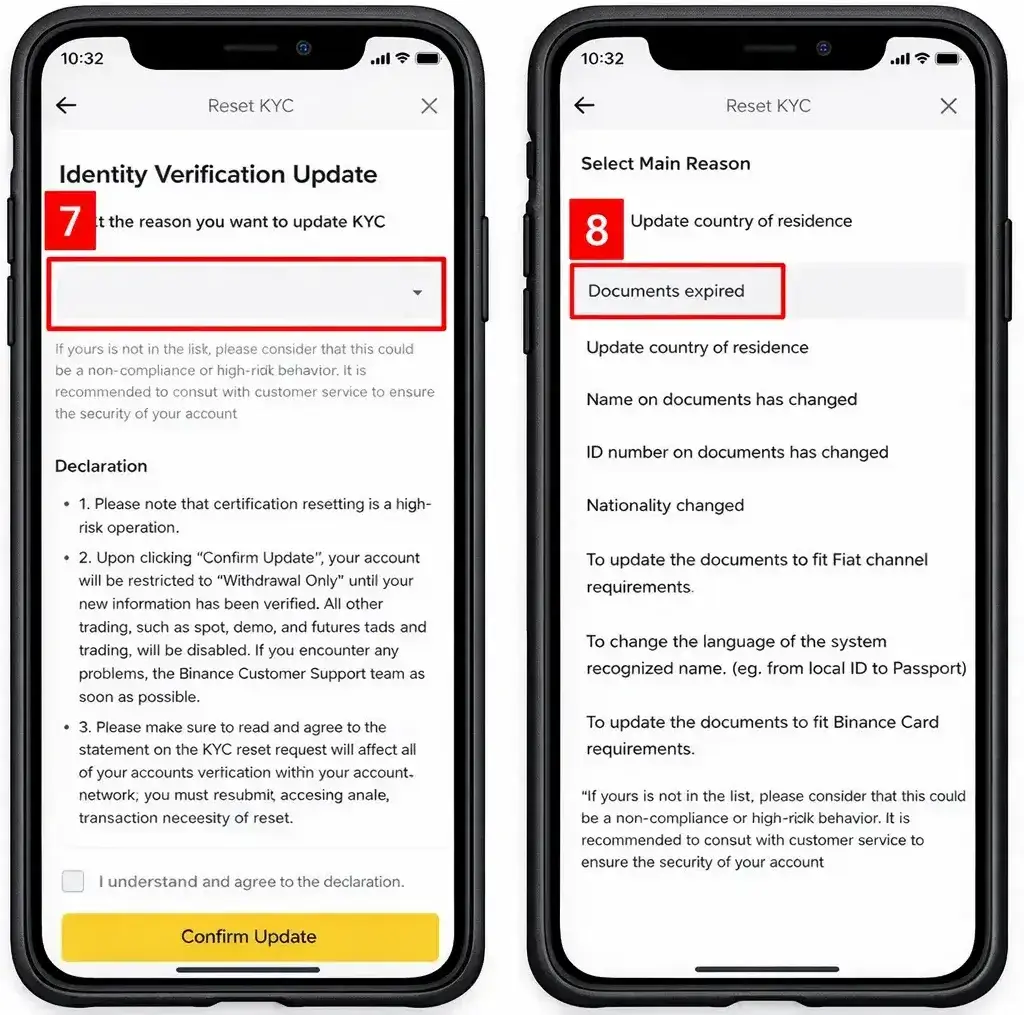
9. Click Confirm Update.
10. When the confirmation screen appears, the KYC reset has been successfully completed.
11. Do not click Continue. Simply close the screen and exit.

3. How to Delete Your Binance Account
After KYC has been reset, proceed with account deletion.
1. On the Binance main screen, tap the three-line menu icon located at the top left.
2. Click the “>” icon at the top-right
3. Select Security

4. Scroll down and click Manage Account
5. Choose Delete Account
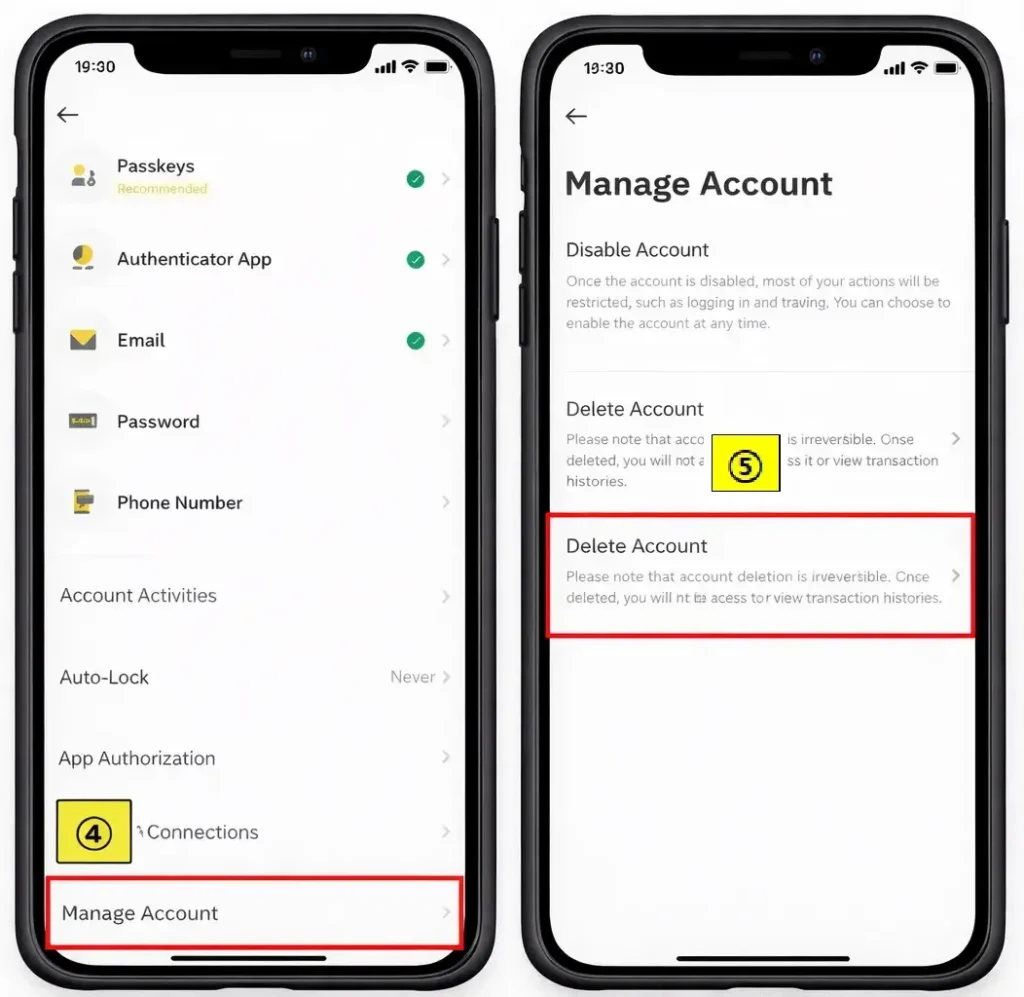
⚠️ Important Notice
Once you proceed with account deletion, the account cannot be restored.
If you followed all steps correctly, your Binance account should now be fully deleted.
4. How to Re-Register on Binance (Correct Way)
- Click “Sign Up with Email or Phone”
⚠️ Do NOT use:
- Continue with Google
- Continue with Apple
- On the registration screen, confirm the Referral ID field
It must show:
HYUK82 - Directly below it, verify that you see:
“Your commission kickback rate: 20%”

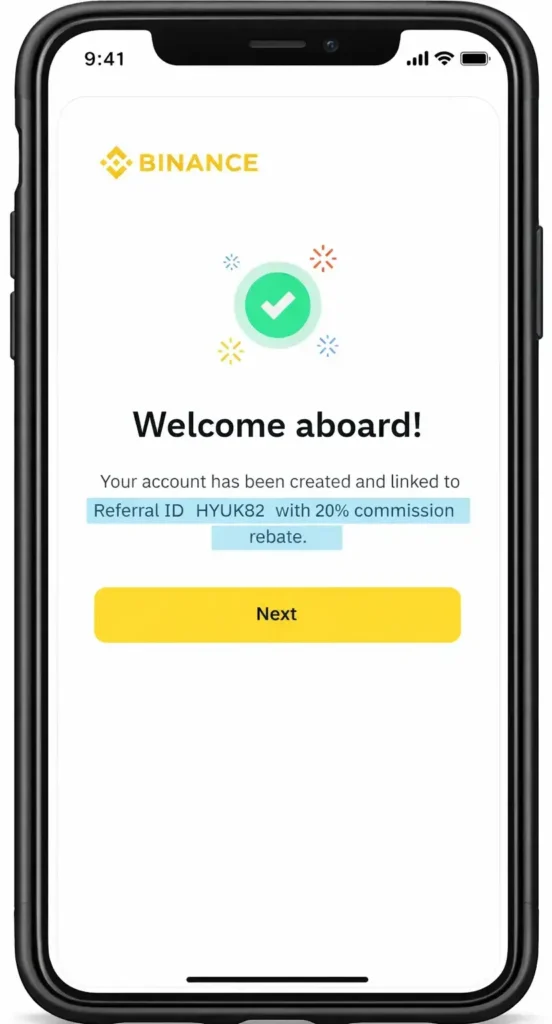
If this message does not appear, do not continue, as the fee discount may not be applied correctly.
5. Important Note About the 20% Fee Discount
The message
“Your commission kickback rate: 20%”
indicates that you are registering through an official partner referral link.
This is the maximum trading fee discount Binance offers to new users at the time of registration.
6. Binance $600 Welcome Rewards – Key Information
Binance offers welcome rewards of up to $600, depending on specific conditions and completed tasks.
⚠️ Please note:
- Existing users are not eligible
- To receive these rewards, previous users must delete their account and re-register
- Rewards depend on completing required actions (such as deposits or trading)
Always review the latest reward conditions directly on Binance, as terms may change.

7. Additional Resources for You
🔄 New Start Guide on Hyukee.com
Ensure your new account is optimized for the lowest possible fees from day one.
Follow these steps to claim the task-based bonuses available to your new Binance account.
Protect your new start by activating Two-Factor Authentication (2FA) immediately.
💡 Editor’s Note: Maximizing Your Trading Setup
If you’re planning to start trading on Binance, using a partner referral link is the most effective way to reduce long-term costs. You can secure a 20% fee rebate applied directly to your account.
Apply 20% Discount to My Account →8. Final Thoughts
If you are unsure about your current account’s referral benefits or trading fee rate,
properly resetting KYC, deleting the account, and re-registering can help ensure:
- Correct referral code application
- Full trading fee discount
- Eligibility for new user rewards
Proceed carefully and verify every step to avoid unnecessary delays or restrictions.
9. Frequently Asked Questions (FAQ)
Q1. Why do I need to reset KYC before deleting my Binance account?
Resetting KYC before account deletion is important because Binance may restrict re-registration with the same identity for up to 2–4 weeks if KYC is not canceled first. Resetting KYC helps avoid unnecessary waiting periods.
Q2. Can I re-register on Binance immediately after deleting my account?
Yes, in most cases you can re-register after deleting your account, as long as KYC has been reset beforehand. If KYC is not reset, re-registration with the same identity may be delayed.
Q3. Will deleting my Binance account affect my funds or transaction history?
Before deleting your account, all funds must be withdrawn and open positions closed. Once the account is deleted, it cannot be restored, and access to the account history will no longer be available.
Q4. How can I confirm that the 20% trading fee discount is applied during re-registration?
During the sign-up process, check that the Referral ID shows HYUK82 and that the message
“Your commission kickback rate: 20%” appears. If this message is missing, the fee discount may not be applied correctly.
Q5. Are existing Binance users eligible for the $600 welcome rewards?
No. The $600 welcome rewards are intended for new users only. Existing users must delete their account and re-register to become eligible, and rewards depend on completing specific required tasks.