Secure your Binance account with our 2026 OTP activation guide.
Learn how to set up Google or Binance Authenticator step-by-step, protect your assets from hackers, and understand why 2FA is mandatory for withdrawals.
Start trading safely with the ultimate security setup today.
1. What Does Binance OTP Mean?
OTP stands for One-Time Password, which is a security code generated for single-use authentication.
On Binance, users are required to enter a newly created OTP code whenever they perform sensitive actions such as logging in, making withdrawals, or changing important security settings.
This extra verification method is mainly supported through Google Authenticator or the official Binance Authenticator application.
Relying only on a normal password is no longer considered safe enough. OTP authentication provides a much stronger level of account protection.
Even if someone manages to obtain your login password, they will still be unable to access your account without the real-time OTP code generated on your personal device.
For this reason, activating OTP on Binance is one of the most essential security steps that every user should complete.
2. Step-by-Step Binance OTP Activation Tutorial
Follow the instructions below to easily set up OTP on your Binance account:
1) Launch the Binance mobile application and tap the Binance menu icon (three horizontal lines) in the upper-left corner.
2) Tap the “ > ” icon located in the top right corner.
3) Select the [Security] option from the menu.
4) Choose [Authenticator App].
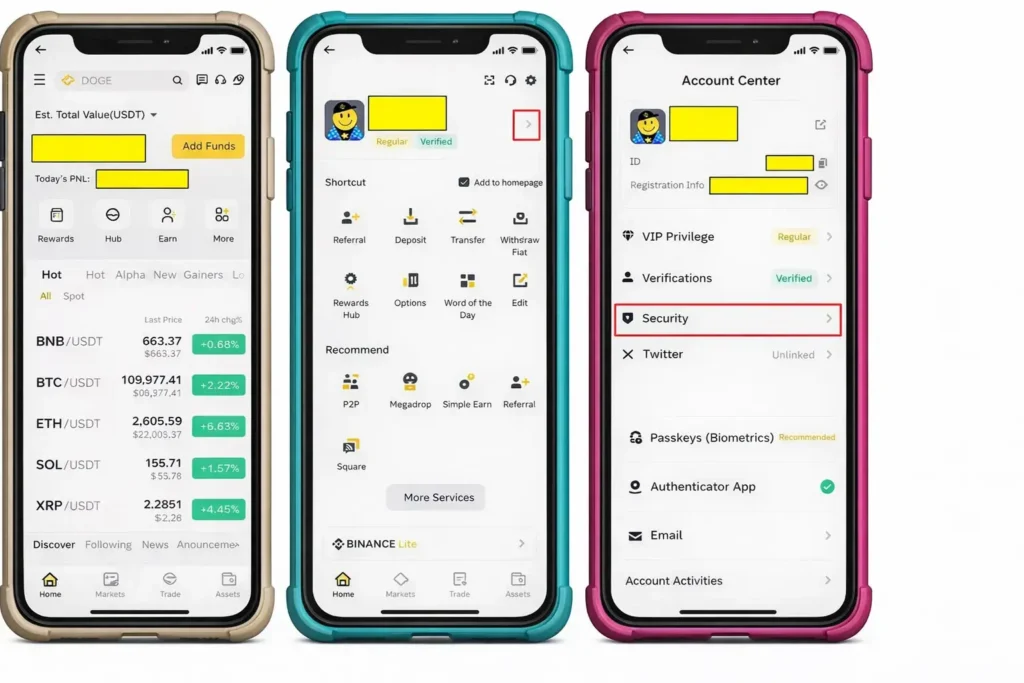
5) Tap the [Enable] button to begin the setup process.
5-1). If you do not have an authenticator app installed on your phone, follow the guide under “How to Enable Authenticator App” to download and install one.
6) Open your registered email inbox and check the 6-digit verification code sent by Binance.
7) Enter the 6-digit email verification code into the required field.

8) Copy the 16-digit security key by tapping “Copy,” then press Next.
(You may also scan the QR code, but this guide explains the manual key entry method.)
9) Open the Google Authenticator application on your smartphone and tap the “+” button.
10) Select the option “Enter a setup key.”
11) Paste the 16-digit key you copied earlier, assign a name such as “Binance OTP,” and tap Add.

12) A new 6-digit code will now appear in Google Authenticator. Enter this code into the Binance app.
13. Complete the confirmation process to finish the registration.
14.) Return to the Security menu and confirm that a checkmark (√) appears next to Authenticator App.

Once these steps are completed, your Binance OTP setup will be successfully activated.
3. Reasons Why Binance OTP Is Essential
3-1. Protection Against Unauthorized Access
Security threats such as phishing attacks, malware infections, and email hacking are becoming increasingly common.
With OTP enabled, even if your password is stolen, hackers cannot log in without the OTP code.
3-2. Stronger Withdrawal Security
Binance requires OTP verification for all withdrawal requests.
This means that even if someone gains access to your account, they cannot transfer your assets without the correct OTP code.
3-3. Compliance With Binance Security Standards
Binance strongly recommends OTP activation as part of its official security policy.
Accounts that do not follow recommended security measures may face limitations in support or protection in the event of suspicious activity.
Setting up Binance OTP takes only a few minutes, but the security benefits are extremely valuable.
Protecting your cryptocurrency assets begins with proper security settings.
By following this guide and enabling OTP, you can enjoy a much safer and more secure trading experience on Binance.
4. Additional Resources for You
🛡️ Account Optimization on Hyukee.com
Now that your account is secure, follow this guide to claim your welcome rewards and bonuses.
Learn how to set up your account for maximum fee efficiency before you place your first trade.
Understand the importance of choosing the right entry strategy for long-term trading success.
💡 Editor’s Note: Maximizing Your Trading Setup
If you’re planning to start trading on Binance, using a partner referral link is the most effective way to reduce long-term costs. You can secure a 20% fee rebate applied directly to your account.
Apply 20% Discount to My Account →