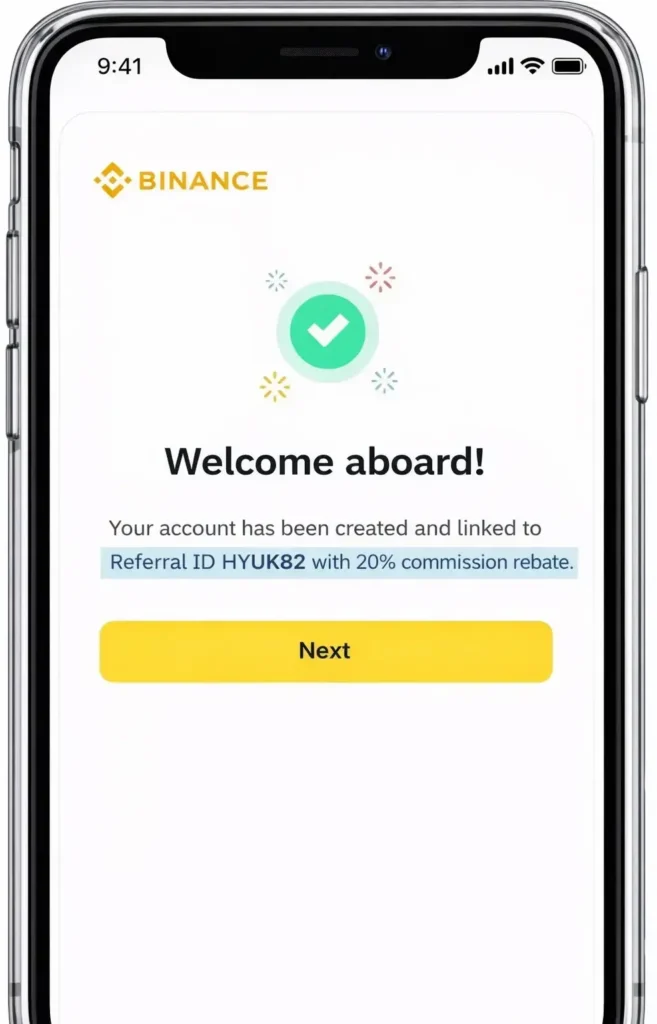
In this post, I will explain how to register on Binance and complete KYC (identity verification) safely and correctly.
If you are new to Binance, following the right steps from the beginning is extremely important, especially to secure the full 20% trading fee discount.
1. Access the Official Fee Discount Registration Page
Start by opening the Binance registration page that offers a 20% trading fee discount.
Before moving forward, please double-check the following two points:
- At the end of the browser address bar (PC version), you should see the Referral Code: HYUK82
- On the page, confirm the phrase:
“Up to 20% Trade Rebates + Up to 600 USD New User Bonus”

Important Notes
- If this sentence does not appear, you should stop and recheck the link.
It may not be a valid referral link, and the fee discount might not be applied. - This confirmation is possible on both PC and mobile devices.
2. Enter Your Email or Mobile Number
- Choose either email registration or mobile number registration
- Agree to the terms and conditions
(I personally recommend email registration for better account recovery.)
3. Email Verification
- Binance will send a 6-digit verification code
- Enter the code exactly as received to proceed

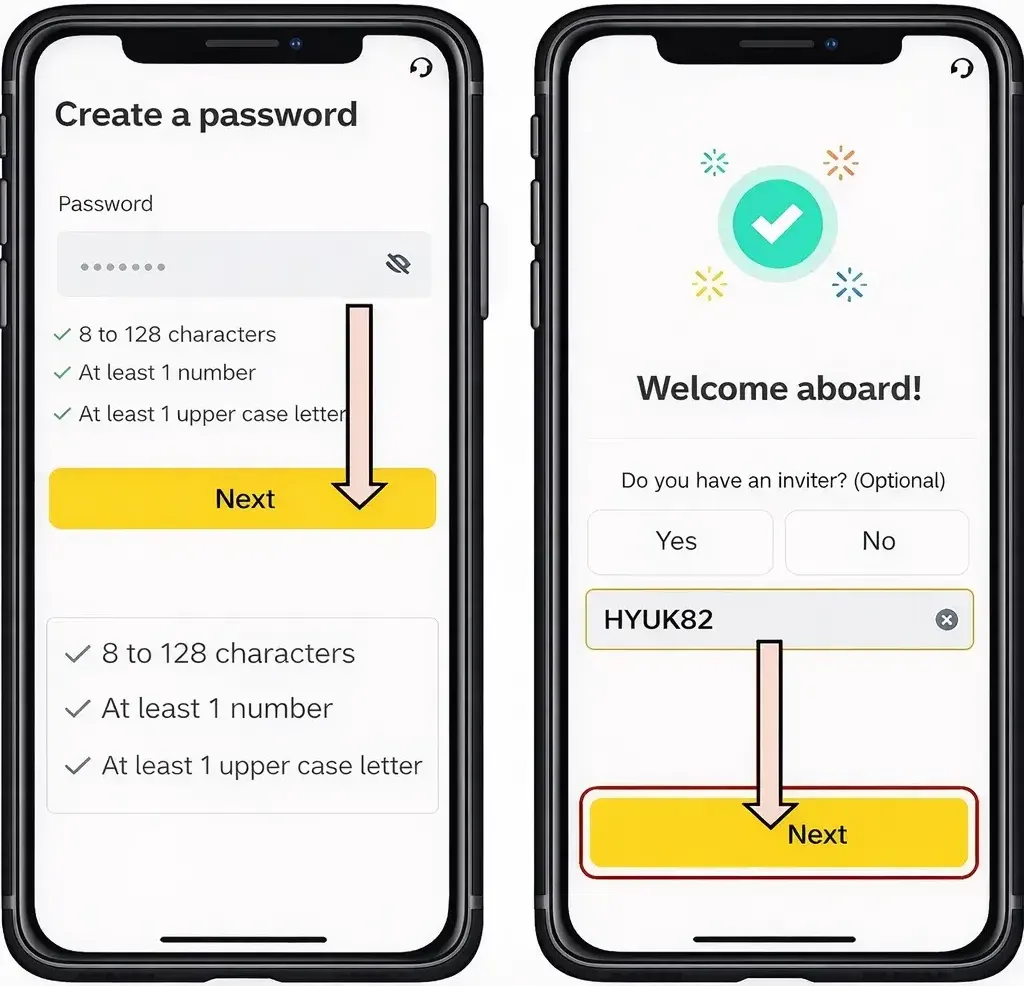
4. Create a Secure Password
Your password must meet all of the following conditions:
- Minimum 8 characters
- At least one number
- At least one uppercase letter
For security reasons, avoid reusing passwords from other platforms.
5. Confirm Referral Code (Very Important)
Before finalizing registration, confirm that you see:
“Referral ID HYUK82 – 20% commission rebate”
⚠️ If you see messages like “0–20% rebate” or “up to 20%”, do not continue.
To receive the maximum guaranteed discount, it must clearly state 20% rebate.
✅ Account Registration Completed
Once the above steps are done, your Binance account is successfully created.
Next, we proceed with KYC (Identity Verification).
[ ☞ Binance KYC Verification Process ]
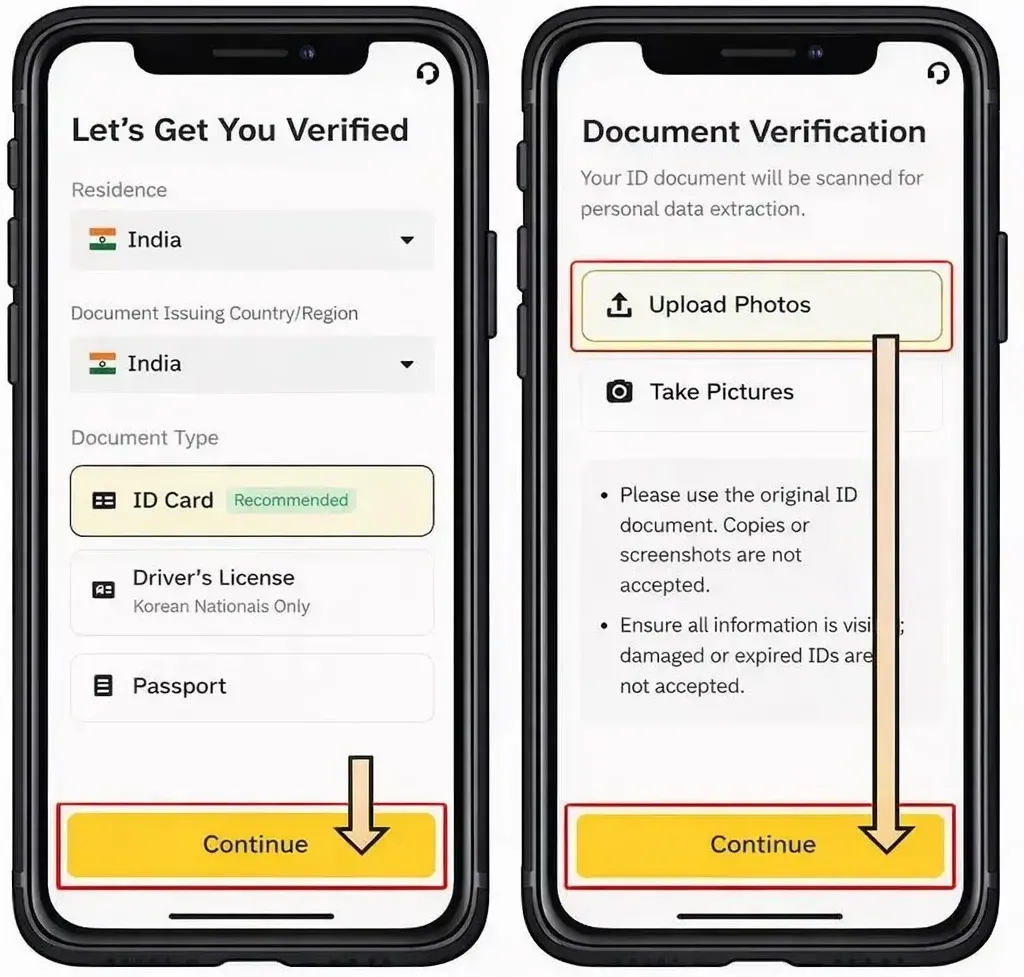
6. Choose an Identity Document
You may select one of the following:
- National ID card
- Driver’s license
- Passport
(Driver’s license is commonly used and works smoothly.)
7. Upload Front and Back Images
- Upload clear photos of both the front and back sides
- Make sure all text is readable and not blurred
Click Continue.

8. Facial Verification (Selfie Check)
- Align your face within the frame
- Follow on-screen instructions:
- Turn your head left and right
- Blink your eyes
- Open and close your mouth
This step confirms that you are a real person.
Click Continue once completed.

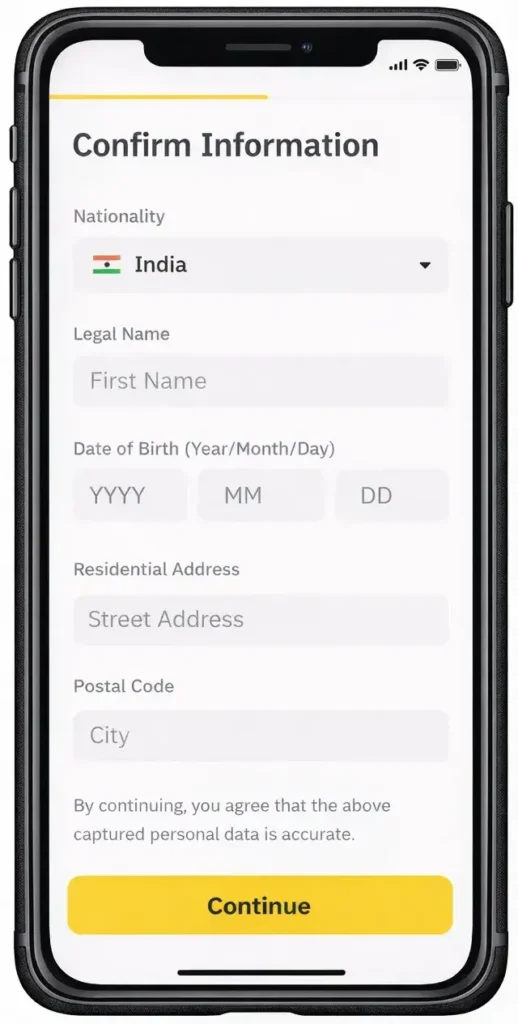
9. Enter Personal Information
- Input your personal details exactly as shown on your ID
- Any mismatch may delay approval
10. Additional Resources for You
🚀 Post-Registration Guide on Hyukee.com
Identity verification is only the beginning. Learn how to protect your funds with 2FA security.
Discover how to unlock the task-based rewards available only to newly verified Binance accounts.
Go beyond the 20% referral discount. Master pro-level tactics to slash your trading costs.
💡 Editor’s Note: Maximizing Your Trading Setup
If you’re planning to start trading on Binance, using a partner referral link is the most effective way to reduce long-term costs. You can secure a 20% fee rebate applied directly to your account.
Apply 20% Discount to My Account →11. Final Approval
- Verification usually completes within 3–5 minutes
- In some cases, it may take up to 24 hours
- You will receive a notification once approved
12. Frequently Asked Questions (Q&A)
Q1. Is KYC mandatory on Binance?
Yes. KYC is required for deposits, withdrawals, and trading. Without it, account functions are limited.
Q2. How long does Binance KYC take?
Most users are approved within a few minutes.
In rare cases, it can take up to 24 hours.
Q3. Can I verify using a national ID card?
Yes. National ID, driver’s license, and passport are all accepted.
Ensure the photo is bright and clear.
Q4. What happens if KYC fails?
Your account will not be suspended.
You can retry, but repeated failures may cause delays.
Q5. How do I receive the trading fee discount?
If you register through the correct link, the discount is applied automatically.
If a referral field appears, manually enter HYUK82.
13. Final Notes
Completing Binance registration and KYC correctly from the start prevents future issues with withdrawals and trading limits.
Always verify the referral code and discount message before signing up to ensure you receive full benefits.
If you follow this guide step by step, even beginners can complete the process smoothly and safely.